
Blog
Email marketing notes.
Email Marketing
Data-Driven & Behavioral Email Marketing for Ecommerce
A practical behavioral email marketing guide for ecommerce, covering customer data, triggers, segmentation, personalization, testing, and measurement.
By Peak Meadow Published August 30, 2026
Data-Driven & Behavioral Email Marketing for Ecommerce
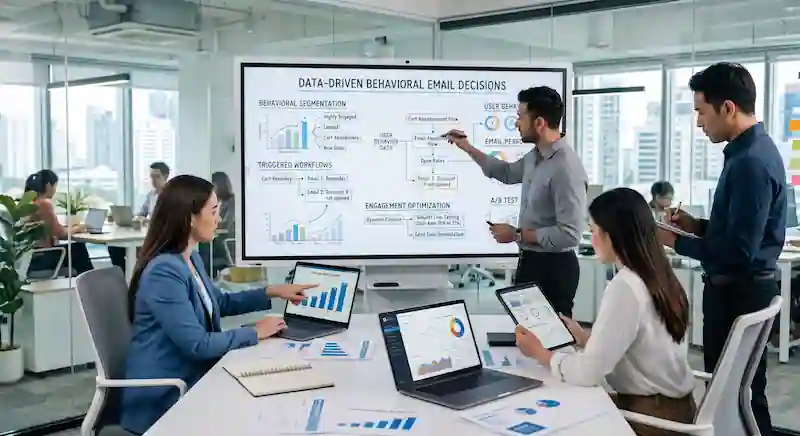
Data-driven email marketing is the process of using customer data to decide who gets an email, what they see, and when they receive it. For ecommerce brands, that usually means using behavior like product views, cart activity, purchase history, email engagement, and customer lifecycle stage to send more relevant messages.
Instead of sending the same campaign to every subscriber, a data-driven email program asks better questions:
- What did this person look at?
- What have they bought before?
- How recently did they engage?
- Are they new, active, at-risk, or lapsed?
- What is the next most useful message for them?
That’s where behavioral email marketing becomes valuable. It lets you respond to what shoppers do with a message that fits the moment.
This guide explains how ecommerce brands can use customer behavior and first-party data to build a stronger email marketing system.
What Makes Email Marketing Data-Driven?
Email marketing becomes data-driven when customer data shapes the strategy instead of only reporting on it afterward.
A basic email program might look at results after a campaign sends. A data-driven email program uses data before, during, and after the send:
| Stage | How data helps |
|---|---|
| Before the send | Choose the audience, offer, timing, and message |
| During the send | Trigger emails based on real customer behavior |
| After the send | Measure performance and improve future emails |
Ecommerce customer behavior changes quickly. A shopper who viewed a product yesterday is different from someone who bought six months ago, and a first-time buyer needs a different message than a loyal customer.
Behavioral Email Marketing vs. Traditional Campaigns
Traditional campaigns are usually calendar-based. You decide to send a product launch, sale announcement, newsletter, or seasonal campaign on a certain date.
Behavioral emails, by contrast, tend to be action-based. They send when a customer does something, or when they reach a certain point in the lifecycle.
Common behavioral triggers include:
- Joining the email list
- Viewing a product
- Adding an item to cart
- Starting checkout
- Making a purchase
- Buying from a certain category
- Reaching a predicted replenishment date
- Going inactive for a set period
- Clicking a specific type of email
Both campaign types matter. Campaigns help you share timely offers and brand updates. Behavioral emails help you respond to live intent.
The strongest ecommerce email programs use both. They use planned campaigns for timely messages and automated flows for live customer behavior.
Why Data-Driven Email Marketing Matters for Ecommerce
Data-driven email marketing matters because ecommerce is full of signals. Every browse session, cart, order, click, and period of silence tells you something about the customer.
When you use those signals well, email can become more useful to the shopper and more effective for the business.
The useful question is not how many segments you can create, but whether a segment changes the message, timing, or offer. A smaller, better-matched audience can be more useful than a large audience with mixed intent.
Data also helps you respond to unfinished intent. A product view, cart add, or checkout start shows a different level of interest, while a completed order should stop recovery messages entirely. Behavioral emails let you follow up with that context instead of guessing.
The Ecommerce Data You Should Use
You don’t need every data point in your platform to make better email decisions. Prioritize data that can clearly change what you send.
| Data type | Examples | How it helps |
|---|---|---|
| Profile data | Location, signup source, customer status, consent status | Adds context, especially when paired with behavior |
| Behavioral data | Product views, category browsing, cart adds, checkout starts, site searches | Shows live interest while it’s still fresh |
| Purchase data | First purchase date, last purchase date, products bought, AOV, lifetime value | Supports retention, cross-sells, replenishment, VIP, and win-back emails |
| Engagement data | Opens, clicks, conversions, unsubscribes, spam complaints, recent engagement | Helps you adjust frequency and protect deliverability |
Behavioral and purchase data usually carry the most weight because they show intent. Profile data can still help, but it shouldn’t be the only reason someone gets a message.
How to Build a Data-Driven Email Strategy
A good data-driven strategy needn’t begin with complex automation. It begins with a clear customer journey.
Step 1: Map the Main Customer Stages
Most ecommerce brands can start with these stages:
| Stage | What the customer needs | Email goal |
|---|---|---|
| New subscriber | Trust and product clarity | Drive the first purchase |
| Active shopper | Help choosing or finishing checkout | Recover intent |
| First-time customer | Reassurance and education | Create a good first experience |
| Repeat customer | Relevant reasons to buy again | Build retention |
| At-risk customer | A timely reason to return | Prevent churn |
| Lapsed customer | A clear re-entry point | Win back interest |
Once these stages are clear, your data has a job: move customers from one stage to the next.
Step 2: Choose the Behaviors That Should Trigger Emails
Not every behavior needs an email. The best triggers are tied to real buying intent or customer experience needs.
High-value ecommerce triggers include:
- Signup: Send a welcome series that introduces the brand, bestsellers, proof points, and first-purchase offer if you use one.
- Product view: Send browse abandonment emails when someone shows interest but doesn’t add to cart.
- Cart add: Send abandoned cart emails when a shopper leaves items behind.
- Checkout start: Send checkout abandonment emails when someone gets closer to purchase but doesn’t finish.
- Purchase: Send post-purchase emails that set expectations, explain product use, and encourage the next step.
- Repeat purchase window: Send replenishment or reorder reminders when timing fits the product.
- Inactivity: Send win-back emails when a customer hasn’t purchased or engaged in a meaningful period.
The timing should match the behavior. A cart reminder can often send within a few hours. A replenishment email may need to wait weeks or months.
Step 3: Segment Campaigns by Intent
Campaigns still matter, but they should be more selective than a full-list blast.
Instead of sending every campaign to everyone, segment by intent and relevance.
Useful campaign segments include:
- Recent site visitors
- Category browsers
- Customers who bought related products
- VIP customers
- Discount-sensitive buyers
- Full-price buyers
- Recent subscribers who haven’t purchased
- Customers due for replenishment
- Engaged non-buyers
- At-risk repeat customers
This doesn’t mean every campaign needs ten versions. It means the audience should make sense for the message. If you’re launching a refill, send it to customers who bought the original product, viewed that category, or are near their reorder window.
Step 4: Personalize the Message
Personalization doesn’t have to mean a fully unique email for every person. In most ecommerce programs, simple personalization is enough.
Examples include:
- Showing recently viewed products
- Recommending products based on purchase history
- Changing copy for first-time buyers vs. repeat buyers
- Showing category-specific content
- Adjusting offers based on customer status
- Using location for shipping deadlines or local weather
- Suppressing products someone already bought
McKinsey reported that 65% of surveyed customers saw targeted promotions as a top reason to make a purchase. Its earlier retail personalization research found that personalization at scale often lifted total sales by 1% to 2% for grocery companies and more for other retailers. These are broad retail findings, not guaranteed email lifts; the useful lesson is that relevance should fit the customer rather than simply make the message louder.
Behavioral Email Flows Worth Building First
If you’re building from scratch, don’t try to automate everything at once. Prioritize the flows that connect directly to customer behavior and revenue.
| Flow | Trigger | Main purpose |
|---|---|---|
| Welcome series | Subscriber joins list | Build trust and drive first purchase |
| Browse abandonment | Product or category viewed | Bring back early intent |
| Abandoned cart | Item added to cart | Recover high-intent shoppers |
| Checkout abandonment | Checkout started | Reduce purchase friction |
| Post-purchase | Order placed | Support the customer and encourage repeat purchase |
| Replenishment | Expected reorder timing | Prompt timely repeat orders |
| Win-back | No purchase after set period | Re-engage at-risk or lapsed customers |
These flows give you a practical foundation. Once they are working, you can add branches based on product category, purchase frequency, customer value, and engagement.
What to Measure
Data-driven email isn’t only about sending smarter emails. It’s also about knowing what is working.
Track performance by flow, campaign, segment, and customer stage. The most useful metrics are revenue per recipient, conversion rate, click rate, placed order rate, average order value, unsubscribe rate, spam complaint rate, repeat purchase rate, and customer lifetime value.
Revenue matters, but it shouldn’t be the only measure. A post-purchase education email may not drive immediate sales, but it can reduce confusion and support the next purchase. Use metrics in context, not in isolation.
Common Mistakes to Avoid
Data can improve email marketing, but it can also make a program messy if you use it without discipline. Watch for these mistakes:
- Using too many segments too early. A segment is only useful if it changes the message, offer, or timing.
- Sending based on weak signals. One product view doesn’t always mean strong intent. Look at timing, repeat behavior, cart activity, and engagement.
- Ignoring data quality. Broken events, duplicate profiles, missing consent, and bad product feeds can make personalization feel careless.
- Treating available data as automatically usable. Tracking and marketing rules vary by location. Configure consent tools, respect channel-specific opt-ins, and collect only the data you can use responsibly.
- Over-personalizing the copy. Customers don’t need to feel watched. Use data to be helpful, not intrusive.
- Letting automations go stale. Behavioral flows need regular review because products, offers, and customer expectations change.
Good data-driven email marketing should feel simple to the customer. The complexity stays behind the scenes.
A Simple Data-Driven Email Framework
Use this framework when planning any ecommerce email:
- Audience: Who should receive this?
- Signal: What data shows they should receive it?
- Need: What does the customer likely need right now?
- Message: What should the email say?
- Offer: Is an incentive needed, or would helpful content be enough?
- Timing: When should it send?
- Suppression: Who should not receive it?
- Measurement: What result will prove it worked?
This framework keeps the strategy grounded. It also prevents the common problem of starting with a promotion and forcing it onto the whole list.
For example, replace “We need to send a 20% off campaign” with a customer question: who needs a reminder, recommendation, reorder prompt, or product education right now?
Conclusion
Data-driven email marketing helps ecommerce brands send better emails by using customer behavior, purchase history, engagement, and lifecycle stage to guide each message. In plain terms, it means sending emails based on what shoppers do and what they likely need next.
Choose one high-value behavior first, verify that the event and consent data are reliable, and build the smallest useful flow around it. Then improve the system through testing and measurement.
The best data-driven email programs don’t feel complicated to the customer. They feel timely, relevant, and useful. If the message would feel surprising or invasive when explained plainly, narrow the data or rethink the send.